
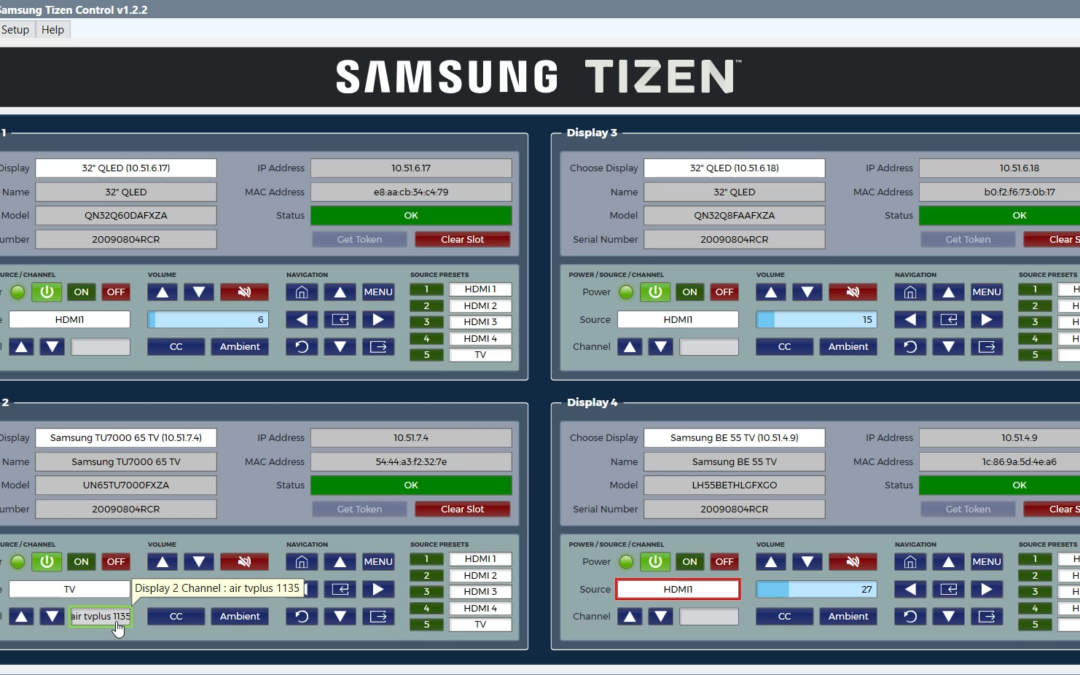

Samsung Tizen Control
A Q-Sys Plugin for controlling Samsung Consumer and Prosumer displays.

This plugin is made to control any Samsung display that uses Tizen OS. This covers most of Samsung's consumer and prosumer displays from the last 10 years or so. This is a licensed product, see directions below.
Getting Started
- Once licensed (see below), you can select how many displays you want to control in Properties, as well as how many displays you would like to see per page. Then on the Settings page, select the NIC you want to use on the Core for controlling the displays (remember the subnet needs to match).
- After that, just turn on each display one by one to discover them. Then select a display from the drop-down to fill the slot. Displays are listed by name and IP address, and the plugin keeps track of each one even if its IP address changes later. Picked the wrong display for a specific slot? Don't panic, just hit Clear Slot and pick the intended display.
- Once a display is selected, the display will ask if the connection is allowed. You MUST accept this before it times out. This is the token exchange. Without it, we will not be able to control the display. Missed it the first time? No problem, just click the Get Token button and try again.
- DONE! After the token is accepted, you should now have full control over the display.
NOTE: Licensing is built into the plugin; the Licensing Hub is no longer needed. One license covers every Samsung Tizen Control block in your design.
Licensing
Online
To activate online, the Core has to have a connection to the internet.
Save the design to the Core, open the Settings page, paste in your license key, then click Activate. The Core's Locking ID is filled in for you. Should you wish to move your license to another Core, simply click the Deactivate button.
Offline
To activate offline, the computer that you are using for Designer still needs access to an internet connection.
Emulate the design, open the Settings page, paste in your license key and enter your Core's Locking ID (from Core Manager), then click Activate. Then push the design to the Core.
Upgrading from a version that used the Licensing Hub?
Deactivate your license in the Hub first, then activate in the plugin's Settings page and remove the Hub from your design.
0 Reviews
Unable to load reviews. Please try again later.
No reviews yet. Be the first to write a review!
Related Products
Christie Projector Control
Fire Control Panel
Lutron LEAP Control
Matrix Audio Router
Spiel Player
LUA based player the can play spiels to any zone or tag using triggers or Time of Day.

Recent Comments